A WordPress Plugin for Theatre People

GreenRoom

The easiest way to collect cast and crew bios for your playbill. Built by a theater person for producers, stage managers, program editors, and anyone else who’s ever chased down missing bios.

Making My Job (and yours) Easier

GreenRoom was born out of necessity and personal experience.

I’ve been managing the website and playbill content for a century-old community theatre for over twenty years. We do a half-dozen or more shows per season, and every time we have the same bio-collection hassles: chasing staff and actors down, prodding people past the deadline, and keeping producers or stage managers informed about whose bio is still missing. Once the bios are in, I still have the time-consuming project of proofing, alphabetizing, and formatting everything before it goes to print. It takes everyone’s focus away from their real work, which is getting a show on the stage.

I built GreenRoom because I wanted to make my own job easier. It automates all of the nagging, gives the production team anytime visibility into who has and hasn’t submitted their bio, and exports with the basic formatting and organization ready for my layout. I even added some bonus tools like displaying the bios right on the show page in the site as they come in.

Having seen how much time it saved me, I’m sharing it with the rest of the theatre community, because I know I’m not the only one who has been doing this the hard way!

Andrew Rothman

Features

GreenRoom handles the entire bio collection process so you can focus on the show, not the paperwork.

Spreadsheet Import

Upload your cast and crew list from a spreadsheet. Names, emails, roles, and whether they're cast, staff, or both.

Personal Submission Links

Each person gets their own private link. No accounts to create, no passwords to remember. Just click and type.

Producer Dashboard

Give your producer a link to manage their show. They can track submissions, send reminders, and export bios without needing a WordPress login.

Headshot Collection

Actors upload their own headshots. You set the minimum size requirements so every photo is print-ready.

Automated Emails

Send invitations, reminders, and confirmations. GreenRoom sends weekly reminders automatically on the day and time you choose — configurable in Settings.

Print-Ready Exports

Export bios to Word, InDesign, HTML, RTF, Markdown, or spreadsheet. Download all headshots as a single ZIP file for your designer.

Returning Performers

When someone comes back for another show, their previous bio is pre-filled. They just update it and submit.

Drag-and-Drop Ordering

Reorder your cast list right on the dashboard. Edit names and roles inline without opening a separate form.

How It Works

From installation to a print-ready playbill in seven steps.

  1. Install and Configure Install the GreenRoom plugin on your WordPress site and activate it. Go to GreenRoom > Settings to enter your theatre’s name, set bio length limits, customize formatting, and edit email templates.
  2. Create a Show Go to GreenRoom > Shows and add your production. Give it a title, set a deadline, and enter the producer’s email. GreenRoom creates a production link you can share with your producer or stage manager.
  3. Import Your Roster Upload a spreadsheet with your cast and crew. Each row has a name, email, role, and whether the person is cast, staff, or both. If someone has multiple roles, just add them on separate rows and GreenRoom will combine them.
  4. Send Invitations Click a button to email everyone their personal submission link. Each person gets their own private link to fill out their bio.
  5. Collect Bios Your cast and crew write their bios, add social media links, and upload headshots. They can make changes up until the deadline. Anyone who’s done a show with you before will see their previous bio pre-filled.
  6. Manage and Review The production dashboard shows who has submitted and who hasn’t. Send reminders to stragglers, edit bios on someone’s behalf, reorder your cast list, or withdraw people who dropped out.
  7. Export for Print When you're ready, export bios in your preferred format. Word and RTF are great for editing, InDesign Tagged Text drops directly into your playbill layout with styles already applied, and you can download all headshots as a single ZIP.
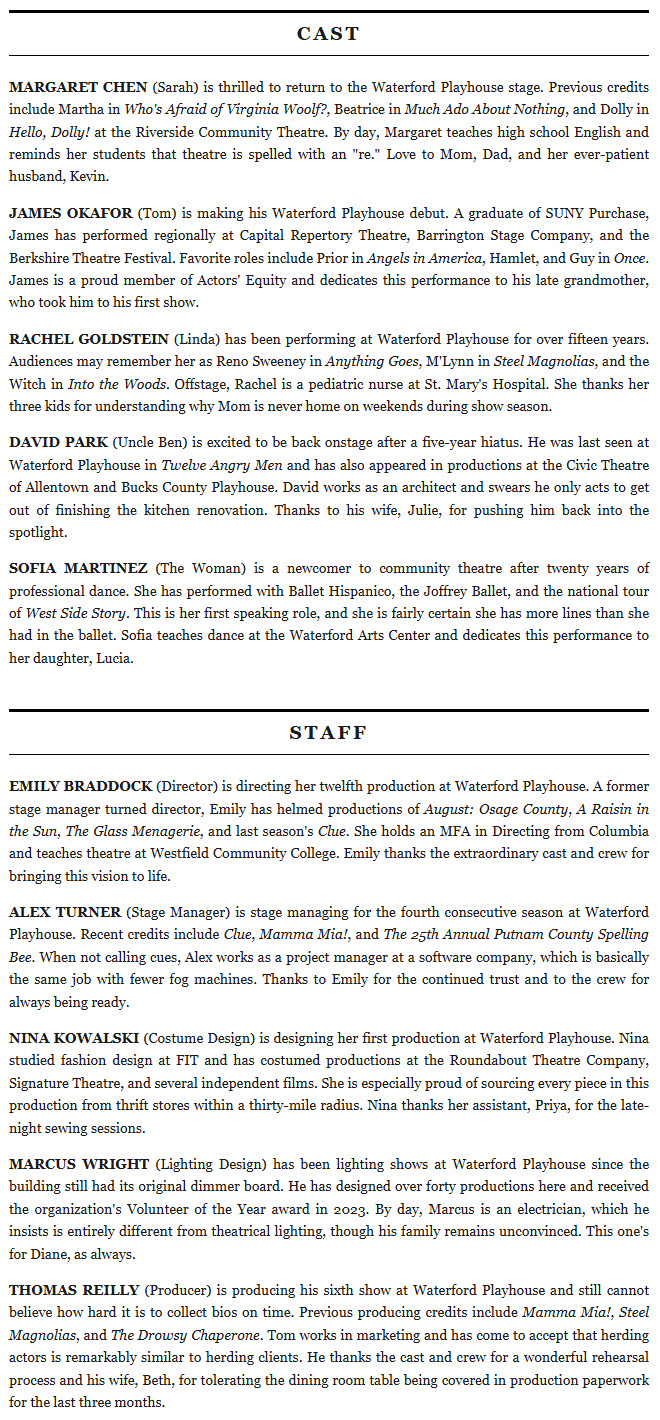
Sample formatted bio output

Bios export in ready-to-use documents for Word, InDesign, and beyond. Sorted and styled.

Cast & Staff Import

Save your cast/crew list as a CSV file (any spreadsheet app can do this). Three or four columns — the section column is optional.

NameEmailRoleSection
First and last nameWhere to send their invitationCharacter name or staff titlecast, staff, or both

Add one at a time: Don’t have a spreadsheet? You can also add people individually from the production dashboard. Just enter a name, email, role, and section.

Returning members: When you enter an email address that GreenRoom has seen before, it automatically pulls in their name and previous bio so they have a head start.

Multiple roles: If someone plays two parts or has multiple titles, just add them on separate rows with the same email. They’ll get one invitation and one bio form, but all their roles will be listed together.

Cast and staff: Use both for people who appear in both sections of your playbill, like an actor who is also the choreographer.

Export Formats

However your playbill gets made, GreenRoom has an export format that fits.

FormatBest ForDetails
Microsoft WordEditing and sharingStandard .docx file your whole team can open and review
InDesign Tagged TextProfessional playbill layoutPlace it directly into InDesign and all the text styles are already set up for you
HTMLWebsites and emailReady to paste into your theatre’s website or a newsletter
RTFAny word processorWorks with virtually every text editor on every platform
MarkdownPlain textSimple formatting that’s easy to convert to anything else
SpreadsheetData and trackingFull roster with submission status and a "Still Waiting On" list
Headshots ZIPPrint productionAll uploaded photos downloaded together in one file for your designer

Bio exports include only people who have submitted. The spreadsheet export includes your full roster so you can see who’s still outstanding.

Display Bios Online

GreenRoom makes it easy for the public to 'meet the cast'! To automatically publish bios on your theatre’s website, just drop this shortcode onto any WordPress page:

[greenroom show="guys-and-dolls"]

Replace the show name with the one you chose when you created the show. The bios will appear on your page using the name and role formatting you've configured in your settings.

Settings

All of these options are found under GreenRoom > Settings in your WordPress admin panel.

General

  • Organization Name - Your theatre’s name, shown in emails and on the submission form.
  • Cast / Staff Sections - Choose whether to separate bios into Cast and Staff, or keep everyone in a single list.

Bio Limits

  • Limit Mode - Cap bios by word count or character count.
  • Maximum Length - How long bios can be (e.g., 100 words or 500 characters).

Formatting

  • Name Format - ALL CAPS, Title Case, or as the person entered it.
  • Name Style - Bold, italic, or plain.
  • Role Format - Same options as names.
  • Role Style - Bold, italic, or plain.

Collect Other Details

  • Headshot Upload - Allow submission of images, with minimum pixel dimensions settings so every headshot is large enough for print.
  • Socials - Making it easier to tag performers in promotional posts.
  • Pronouns - Add a pronouns field to the submission form.

Email Templates

  • Invitation - The email people get with their submission link.
  • Reminder - Nudge people who haven’t submitted yet. Can be sent manually or automatically each week.
  • Confirmation - Sent after someone submits or updates their bio.
  • Producer Status - Lets the producer know when all bios are in.
  • Playbill Editor Notice - Tells your playbill editor that bios are ready to export.

Pricing

GreenRoom is a fully functional free plugin. GreenRoom Pro is a separate add-on you install alongside the free plugin to run multiple productions at once and polish bios with AI.

GreenRoom

$0
Free forever on WordPress.org
  • One active production at a time
  • Unlimited cast and crew
  • All export formats
  • Producer dashboard
  • Automated emails and reminders
  • Spreadsheet import
  • Headshot collection
  • Past shows preserved in Archive
Download

GreenRoom Pro

$50 per website
Add-on plugin — requires free GreenRoom. One-time purchase, no subscription.
  • Multiple concurrent active productions
  • AI bio polish (WP 7.0 AI Client)
  • People preserved across shows when a production is deleted
  • Pluralized “Shows” menu and multi-show workflows
  • Everything in the free plugin
Get Pro License
Free Forever
$0TIPS WELCOME!
Pro Upgrade
$50per website
Concurrent active shows 1 at a time Unlimited
Cast & crew per show Unlimited Unlimited
All export formats
Producer dashboard
Emails & reminders
Spreadsheet import
Headshot collection
AI bio polish (WP 7.0)
People preserved on show delete
Download Get Pro

Contact

Have a question, need help, or want to purchase a Pro license? Send a message and I’ll get back to you.